
import json
import requests
from bs4 import BeautifulSoup
import string
import matplotlib.pyplot as plt

# 定义停用词和标点映射表
stopwords = {"a", "an", "the", "is", "and", "or", "in", "on", "of"}
table = str.maketrans('', '', string.punctuation)

# 使用 requests 直接下载数据
url = "https://storage.googleapis.com/learning-datasets/sarcasm.json"
print(f"正在从 {url} 下载数据...")

try:
    response = requests.get(url, timeout=10)
    response.raise_for_status()  # 如果请求失败(如404),会抛出异常
    datastore = response.json()  # 直接将响应内容解析为 JSON
    print("数据下载并解析成功!")
except Exception as e:
    print(f"下载失败,请检查网络连接。错误信息: {e}")
    # 如果这个链接也失效,可以使用下面的备用 GitHub 镜像链接
    # url = "https://raw.githubusercontent.com/sahil0612/Sarcasm-Detection/main/Sarcasm_Headlines_Dataset.json"
    # response = requests.get(url)
    # datastore = response.json()

# --- 接下来是你原来的数据处理逻辑 ---
sentences = []
labels = []
urls = []

for item in datastore:
    sentence = item['headline'].lower()
    sentence = sentence.replace(",", " , ")
    sentence = sentence.replace(".", " . ")
    sentence = sentence.replace("-", " - ")
    sentence = sentence.replace("/", " / ")

    soup = BeautifulSoup(sentence, "html.parser") # 建议加上解析器
    sentence = soup.get_text()
    words = sentence.split()

    filtered_words = []
    for word in words:
        word = word.translate(table)
        if word and word not in stopwords: # 增加 word 非空判断
            filtered_words.append(word)

    sentences.append(" ".join(filtered_words))
    labels.append(item['is_sarcastic'])
    urls.append(item['article_link'])

# --- 绘图逻辑 ---
ys = [len(sentence) for sentence in sentences]
newys = sorted(ys)

plt.plot(range(len(newys)), newys)
plt.axis([20000, 27000, 50, 250])
plt.show()

if len(newys) > 20000:
    print(f"排序后第 20000 个句子的长度为: {newys[20000]}")
else:
    print(f"数据集总数为 {len(newys)},未达到 20000 条")
这段Python代码的主要功能是**从网络下载讽刺新闻标题数据集,对其进行文本预处理(清洗、分词、去停用词等),并通过对句子长度进行排序和可视化,来分析数据集中句子长度的分布情况**。
下面我将从实现原理、用途和注意事项三为你详细解释这段代码:
### 一、 实现原理与代码逐段解析
#### 1. 环境准备与常量定义
```python
import json, requests, string, matplotlib.pyplot as plt
from bs4 import BeautifulSoup
stopwords = {"a", "an", "the", "is", "and", "or", "in", "on", "of"}
table = str.maketrans('', '', string.punctuation)
```
* 停用词 (stopwords):定义了一组在自然语言处理中通常没有实际意义的高频词,需要在预处理时过滤掉。
* 标点映射表 (table):使用 str.maketrans('', '', string.punctuation) 生成一个转换表,第三个参数表示要删除的字符,这里会删除所有英文标点符号。
#### 2. 数据获取
```python
url = "https://storage.googleapis.com/learning-datasets/sarcasm.json"
# ... requests.get() 与异常处理 ...
datastore = response.json()
```
* 使用 requests 库发送 HTTP GET 请求获取 JSON 数据。
* response.raise_for_status() 确保如果请求返回错误状态码(如 404、500),程序会主动抛出异常,而不是静默失败。
* response.json() 直接将 JSON 格式的响应体解析为 Python 的列表/字典。
#### 3. 文本预处理(核心逻辑)
```python
for item in datastore:
sentence = item['headline'].lower()
# 特殊符号两边加空格
sentence = sentence.replace(",", " , ") ...
# HTML标签清理
soup = BeautifulSoup(sentence, "html.parser")
sentence = soup.get_text()
# 分词与过滤
words = sentence.split()
# ...
```
* 统一小写lower() 将所有单词转为小写,避免 "The" 和 "the" 被识别为两个不同的词。
* 标点隔离:将逗号、句号等替换为 空格+标点+空格(如 word, 变为 word , ),确保后续 split() 按空格分词时,标点能成为独立的 token,而不是粘在单词上。
* HTML解析:使用 BeautifulSoup 剥离可能存在的 HTML 标签(如 <b> 等),只保留纯文本。
* 分词与去标点split() 按空格切分单词,然后 word.translate(table) 删除单词前后的标点(如将 "it's" 变为 "its",将独立标点 "," 变为空字符串 "")。
* 去停用词与空词:过滤掉无意义的停用词和经过标点删除后产生的空字符串。
#### 4. 数据可视化与统计
```python
ys = [len(sentence) for sentence in sentences]
newys = sorted(ys)
plt.plot(range(len(newys)), newys)
plt.axis([20000, 27000, 50, 250])
```
* 计算每个处理后的句子长度(按字符数计算,包含空格),并对其进行升序排序。
* 绘制折线图:X轴是句子索引(0到数据集总数),Y轴是对应的句子长度。排序后的长度曲线会呈现一条平滑上升的曲线。
* plt.axis([20000, 27000, 50, 250]) 放大了图表的局部区域,专门观察索引在 20000 到 27000 之间,长度在 50 到 250 之间的句子分布。
---
### 二、 代码用途
1. NLP 数据集探索性分析 (EDA):这是构建机器学习/深度学习模型(如讽刺检测分类器)前的标准步骤。通过清洗文本和分析句子长度,可以帮助我们决定后续模型(如 RNN、Transformer)的 max_length(最大序列长度)参数。
2. 长尾分布检测:排序并绘图可以直观地看到数据集中是否存在极长的异常句子(离群点),这些异常值可能会导致模型训练时内存溢出或注意力机制失效。
3. 数据清洗流水线:该代码提供了一套完整的文本清洗范式:获取数据 -> 大小写转换 -> 符号隔离 -> HTML清洗 -> 分词 -> 去标点 -> 去停用词 -> 重组。可以作为其他文本分类任务的模板。
---
### 三、 注意事项与改进建议
1. *len(sentence) 计算的是字符数,而非单词数**:
在 NLP 中,决定 max_length 的通常是*单词(或 Token)的数量**,而不是字符数量。
* 如果想统计单词数,应改为ys = [len(sentence.split()) for sentence in sentences]。
2. 停用词表过于简陋:
* 当前停用词表只有 9 个单词,非常不完整。建议使用 nltk.corpus.stopwords 或 sklearn.feature_extraction.text 中的标准停用词表。
3. *BeautifulSoup 的性能开销**:
* 在这个数据集中,新闻标题通常不包含 HTML 标签。对每一条句子都实例化一个 BeautifulSoup 对象会非常耗时。
* 如果仅仅是为了转义 HTML 实体(如 & -> &),可以使用内置的 html.unescape(),效率会高得多。
4. 标点处理的边界情况:
* word.translate(table) 会直接删除标点。这意味着 "it's" 会变成 "its"(完全改变了词义),而 "don't" 会变成 "dont"。在严肃的 NLP 任务中,建议使用更智能的分词器(如 spaCy, NLTK 的 word_tokenize,或 HuggingFace 的 AutoTokenizer),它们能更好地处理缩写和撇号。
5. 图表坐标硬编码:
* plt.axis([20000, 27000, 50, 250]) 中的区间是写死的。如果更换了数据集,这个视图可能什么都看不到。建议根据数据实际长度动态设置,例如:
```python
plt.axis([len(newys)*0.7, len(newys), 0, max(newys)*0.8])
```
如果你有关于这段代码的进一步修改需求(例如想把它改写为 PyTorch 的数据预处理 Pipeline),随时可以告诉我!
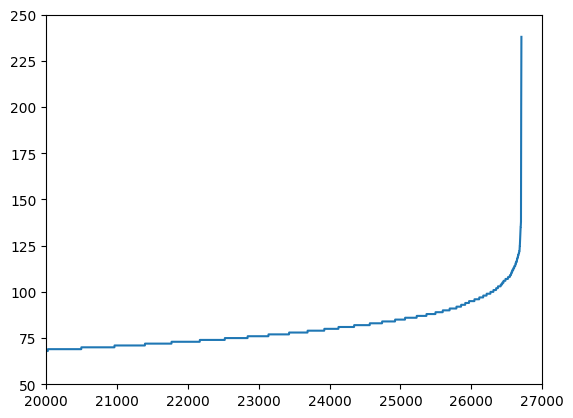
排序后第 20000 个句子的长度为: 68