
import os
import urllib.request
import tarfile

def download_and_extract(url, destination):
    if not os.path.exists(destination):
        os.makedirs(destination, exist_ok=True)
    file_path = os.path.join(destination, "aclImdb_v1.tar.gz")

    if not os.path.exists(file_path):
        print("Downloading the dataset...")
        urllib.request.urlretrieve(url, file_path)
        print("Download complete.")

    if "aclImdb" not in os.listdir(destination):
        print("Extracting the dataset...")
        with tarfile.open(file_path, 'r:gz') as tar:
            tar.extractall(path=destination)
        print("Extraction complete.")

# URL for the dataset
dataset_url = "http://ai.stanford.edu/~amaas/data/sentiment/aclImdb_v1.tar.gz"
download_and_extract(dataset_url, "./data")
这段Python代码的主要功能是**从指定的URL下载IMDb(互联网电影数据库)影评数据集的压缩包,并将其解压到本地指定的目录中**。这是一个在自然语言处理(NLP)和机器学习领域非常常见的数据准备步骤。
下面我将从实现原理、用途和注意事项三个方面为您详细解释:
### 一、 实现原理(代码逐行解析)
1. **导入必要的库**:
- os:用于处理文件和目录路径,以及检查文件是否存在、创建目录等。
- urllib.request:Python标准库中用于处理URL请求的模块,这里用于下载文件。
- tarfile:用于读取和写入tar归档文件(包括gzip压缩.tar.gz文件),这里用于解压。
2. **定义核心函数 download_and_extract(url, destination)**:
- **创建目标目录**:
```python
if not os.path.exists(destination):
os.makedirs(destination, exist_ok=True)
```
检查目标文件夹(./data)是否存在,如果不存在则创建exist_ok=True 表示如果目录已存在不会抛出异常(尽管外层已经做了判断,但加上这个参数是更健壮的写法)。
- **定义压缩包路径及下载逻辑**:
```python
file_path = os.path.join(destination, "aclImdb_v1.tar.gz")
if not os.path.exists(file_path):
urllib.request.urlretrieve(url, file_path)
```
拼接出压缩包的完整存储路径。通过 os.path.exists 检查文件是否已存在,**只有当文件不存在时才执行下载**。这是一种“断点续传”的简化实现,防止重复下载浪费时间和带宽。
- **解压逻辑**:
```python
if "aclImdb" not in os.listdir(destination):
with tarfile.open(file_path, 'r:gz') as tar:
tar.extractall(path=destination)
```
检查目标目录中是否已经存在解压后的文件夹 aclImdb。如果不存在,则使用 tarfile.open 以读取gzip压缩格式'r:gz')打开文件,并使用 extractall 将其解压到目标目录。同样,这避免了重复解压。
3. **执行代码**:
- 定义了斯坦福大学提供的IMDb数据集的官方URL。
- 调用函数,将数据下载并解压到当前目录下的 ./data 文件夹中。
---
### 二、 用途
1. **获取NLP经典数据集**:这段代码专门用于获取 **Large Movie Review Dataset (IMDb影评数据集)**。该数据集包含50,000条极度两极分化的电影评论,常用于**二分类情感分析**(判断影评是正面还是负面)。
2. **机器学习数据预处理**:在构建深度学习模型(如使用PyTorch、TensorFlow训练文本分类模型)之前,通常需要一个自动化脚本来获取和准备数据,这段代码就是数据管道的起点。
3. **通用文件下载与解压模板**:虽然它针对的是IMDb数据集,但稍微修改URL、文件名和解压逻辑,这段代码就可以作为下载和解压任何 .tar.gz 格式数据集的通用模板。
---
### 三、 注意事项与改进建议
1. **安全隐患(重要)**:
- **问题**tar.extractall() 存在潜在的路径遍历安全漏洞(CVE-2007-4559)。如果压缩包内包含恶意构造的文件(例如文件名为 ../../etc/passwd),解压时可能会覆盖系统重要文件。
- **改进**:在Python 3.12+ 中tarfile 新增了 filter 参数,建议使用 tar.extractall(path=destination, filter='data') 来过滤危险路径。如果使用较低版本Python,建议手动遍历 tar.getmembers() 并检查每个成员的路径是否合法。
2. **缺乏下载进度反馈**:
- **问题**urllib.request.urlretrieve 默认在下载大文件时没有任何进度提示,程序看起来像卡住了(该数据集约80MB)。
- **改进**:可以给 urlretrieve 传入一个 reporthook 回调函数来打印下载进度:
```python
def show_progress(block_num, block_size, total_size):
downloaded = block_num * block_size
progress = downloaded / total_size * 100
print(f"\rDownload progress: {progress:.1f}%", end="")
urllib.request.urlretrieve(url, file_path, show_progress)
```
3. **网络异常处理**:
- **问题**:代码中没有 try-except 块。如果网络断开或URL失效,程序会直接崩溃,且可能留下不完整的损坏文件。
- **改进**:添加异常捕获机制,如果下载失败则删除不完整的文件,并给出友好提示。
4. **解压判断逻辑的健壮性**:
- **问题**if "aclImdb" not in os.listdir(destination) 这个判断依赖于解压后的文件夹名称必须是 aclImdb。如果压缩包内部结构改变,或者目标目录里恰好有个同名的空文件夹,逻辑可能会出错。
- **改进**:更严谨的做法是检查解压后应该存在的某个特定核心文件是否存在,而不是仅仅检查目录名。
5. **更现代的替代方案**:
- 在实际的深度学习项目中,通常会使用更高级的库,例如 datasets (Hugging Face) 或 torchvision,它们内部已经封装了安全的下载、校验和解压逻辑。例如,使用Hugging Face datasets只需两行代码:
```python
from datasets import load_dataset
dataset = load_dataset("imdb")
```
总结来说,这段代码逻辑清晰,实现了基本的下载与解压功能,适合用于小型项目或学习演示。但在生产环境或对安全性、健壮性要求较高的项目中,需要针对上述注意事项进行升级改造。
from collections import Counter
import os

# Simple tokenizer
def tokenize(text):
    return text.lower().split()

# Build vocabulary
def build_vocab(path):
    counter = Counter()
    for folder in ["pos", "neg"]:
        folder_path = os.path.join(path, folder)
        for filename in os.listdir(folder_path):
            with open(os.path.join(folder_path, filename), 'r', encoding='utf-8') as file:
                counter.update(tokenize(file.read()))
    return {word: i+1 for i, word in enumerate(counter)}  # Starting index from 1

vocab = build_vocab("./data/aclImdb/train/")
下面我将为你详细解释这段Python代码的含义、实现原理、用途以及使用时的注意事项。
### 一、 代码含义概述
这段代码的主要功能是**读取文本数据集(IMDB影评数据集),对文本进行分词,并统计所有单词的出现频率,最终构建一个将单词映射为整数索引的词汇表**。这是自然语言处理(NLP)任务中最基础且关键的“数据预处理”步骤。
### 二、 实现原理与逐行解析
1. 导入依赖库
```python
from collections import Counter
import os
```
- Counter:是Python标准库中专门用于计数的工具,可以像字典一样统计元素出现的次数。
- os:用于处理文件路径和目录操作,保证代码在不同操作系统(Windows/Linux/Mac)上的兼容性。
2. 简单分词函数
```python
def tokenize(text):
return text.lower().split()
```
- 原理:首先将文本全部转换为小写lower()),这样可以避免同一个单词因大小写不同(如 "The" 和 "the")被统计为两个不同的词。然后使用 split() 按空白符(空格、换行等)将句子切分成单词列表。
- 注意:这是一种非常粗糙的分词方式,没有处理标点符号(如 "hello!" 和 "hello" 会被视为两个词),也没有处理缩写(如 "don't")。
3. 构建词汇表函数
```python
def build_vocab(path):
counter = Counter()
for folder in ["pos", "neg"]: # 遍历正向和负向文件夹
folder_path = os.path.join(path, folder)
for filename in os.listdir(folder_path): # 遍历文件夹下的所有文件
with open(os.path.join(folder_path, filename), 'r', encoding='utf-8') as file:
counter.update(tokenize(file.read())) # 读取文件内容,分词后更新词频统计
return {word: i+1 for i, word in enumerate(counter)} # 生成单词到索引的映射字典
```
- 原理:
- 初始化一个空的 Counter 对象。
- 假设数据集结构为 train/pos/(正面评论)和 train/neg/(负面评论),代码依次遍历这两个子目录。
- 读取每一个文本文件,调用 tokenize 分词,并用 counter.update() 将这些词加入统计update 方法会自动累加相同单词的频次。
- 最后,通过字典推导式生成词汇表enumerate(counter) 会按照**词频从高到低**的顺序Counter的默认迭代顺序)为每个单词分配一个序号i+1 的设计是为了将索引从 1 开始(0 通常留给后续模型中的填充符 <PAD> 或未知符 <UNK>)。
4. 执行构建
```python
vocab = build_vocab("./data/aclImdb/train/")
```
- 指定本地IMDB训练集的路径,执行上述逻辑,返回词汇表字典并赋值给 vocab。
### 三、 代码用途
1. 文本向量化:机器学习模型无法直接处理字符串,必须将文本转换为数字vocab 字典就是映射的桥梁。例如,将句子 "this movie is great" 转换为 [12, 5, 8, 120] 这样的整数序列。
2. 词频过滤:由于 Counter 按词频排序,在实际使用 vocab 时,可以很方便地只取前 N 个高频词(如前 10000 个),过滤掉低频的拼写错误或生僻词,从而减小模型体积,防止过拟合。
3. Embedding 层输入:为 PyTorch 或 TensorFlow 中的 nn.Embedding 层提供输入张量。
### 四、 注意事项与改进建议
1. 分词过于简陋:
- split() 不会剥离标点符号。建议使用正则表达式(如 re.findall(r'\b\w+\b', text))或成熟的分词库(如 NLTK, spaCy)来替代 tokenize 函数。
2. 缺少特殊标记:
- 真正的NLP词汇表通常需要预留固定的索引给特殊字符。例如:索引 0 分配给 <PAD>(用于填充不同长度的句子),索引 1 分配给 <UNK>(代表词汇表外的未知词)。当前代码没有处理这些。
3. 低频词处理:
- 当前代码将所有出现过的词都加入了词汇表,这会导致词汇表极其庞大且包含很多无意义的错别字。建议在生成字典前加一个频次阈值过滤,例如return {word: i+1 for i, (word, count) in enumerate(counter.items()) if count >= 5}。
4. 内存与性能:
- file.read() 会一次性读取整个文件。如果存在极大的单文件文本,可能导致内存激增。对于超大文件,建议逐行读取for line in file:)。
5. 编码问题:
- 代码中指定了 encoding='utf-8',这对于大多数英文数据集是没问题的。但如果数据集中混入了非UTF-8编码的文件,会抛出 UnicodeDecodeError。可以增加异常处理或使用 errors='ignore' 参数。
改进后的词汇表构建参考:
from collections import Counter
import os
import re

def tokenize(text):
    # 使用正则表达式提取单词,忽略标点符号
    return re.findall(r'\b\w+\b', text.lower())

def build_vocab(path, min_freq=5):
    counter = Counter()
    for folder in ["pos", "neg"]:
        folder_path = os.path.join(path, folder)
        if not os.path.exists(folder_path): continue
        for filename in os.listdir(folder_path):
            file_path = os.path.join(folder_path, filename)
            with open(file_path, 'r', encoding='utf-8', errors='ignore') as file:
                for line in file:
                    counter.update(tokenize(line))

    # 预留特殊标记:0给PAD,1给UNK
    vocab = {"<PAD>": 0, "<UNK>": 1}
    idx = 2
    for word, count in counter.items():
        if count >= min_freq:  # 过滤低频词
            vocab[word] = idx
            idx += 1
    return vocab
希望这个解释对你有所帮助!如果你还有其他关于代码或NLP的问题,随时可以问我。
from collections import Counter
import os
import re
import matplotlib.pyplot as plt
from wordcloud import WordCloud

# ==========================================
# 1. 数据处理核心函数 (使用你提供的代码)
# ==========================================
def tokenize(text):
    return re.findall(r'\b\w+\b', text.lower())

def build_vocab(path, min_freq=5):
    counter = Counter()
    for folder in ["pos", "neg"]:
        folder_path = os.path.join(path, folder)
        if not os.path.exists(folder_path): continue
        for filename in os.listdir(folder_path):
            file_path = os.path.join(folder_path, filename)
            with open(file_path, 'r', encoding='utf-8', errors='ignore') as file:
                for line in file:
                    counter.update(tokenize(line))

    vocab = {"<PAD>": 0, "<UNK>": 1}
    idx = 2
    for word, count in counter.items():
        if count >= min_freq:
            vocab[word] = idx
            idx += 1
    return vocab, counter # 🔥 修改:同时返回词频统计器 Counter

# ==========================================
# 2. 新增:按情感分类统计词频
# ==========================================
def get_sentiment_word_counts(path):
    pos_counter = Counter()
    neg_counter = Counter()

    # 英文常见停用词,过滤掉无意义的词汇 (如 the, is, a)
    stop_words = set(['the', 'a', 'an', 'is', 'was', 'are', 'were', 'be', 'been', 'being',
                      'have', 'has', 'had', 'do', 'does', 'did', 'will', 'would', 'shall',
                      'should', 'may', 'might', 'must', 'can', 'could', 'i', 'me', 'my',
                      'we', 'our', 'you', 'your', 'he', 'his', 'she', 'her', 'it', 'its',
                      'this', 'that', 'these', 'those', 'am', 'in', 'to', 'of', 'and',
                      'for', 'on', 'with', 'at', 'by', 'from', 'as', 'into', 'through',
                      'during', 'before', 'after', 'above', 'below', 'between', 'out', 'off',
                      'over', 'under', 'again', 'further', 'then', 'once', 'here', 'there',
                      'when', 'where', 'why', 'how', 'all', 'each', 'every', 'both', 'few',
                      'more', 'most', 'other', 'some', 'such', 'no', 'nor', 'not', 'only',
                      'own', 'same', 'so', 'than', 'too', 'very', 's', 't', 'just', 'don',
                      'now', 'd', 'll', 'm', 'o', 're', 've', 'y', 'ain', 'aren', 'couldn',
                      'didn', 'doesn', 'hadn', 'hasn', 'haven', 'isn', 'ma', 'mightn',
                      'mustn', 'needn', 'shan', 'shouldn', 'wasn', 'weren', 'won', 'wouldn',
                      'movie', 'film', 'one', 'character', 'story', 'scene']) # 移除与情感无关的电影通用词

    for folder, counter in [("pos", pos_counter), ("neg", neg_counter)]:
        folder_path = os.path.join(path, folder)
        if not os.path.exists(folder_path): continue
        for filename in os.listdir(folder_path):
            file_path = os.path.join(folder_path, filename)
            with open(file_path, 'r', encoding='utf-8', errors='ignore') as file:
                tokens = tokenize(file.read())
                # 过滤停用词
                filtered_tokens = [t for t in tokens if t not in stop_words]
                counter.update(filtered_tokens)

    return pos_counter, neg_counter

# ==========================================
# 3. 执行逻辑与可视化
# ==========================================
dataset_path = "./data/aclImdb/train/"

if os.path.exists(dataset_path):
    print("正在构建词汇表并统计词频...")
    vocab, total_counter = build_vocab(dataset_path)
    print(f"词汇表大小: {len(vocab)}")

    print("正在按情感分类统计词频...")
    pos_counts, neg_counts = get_sentiment_word_counts(dataset_path)

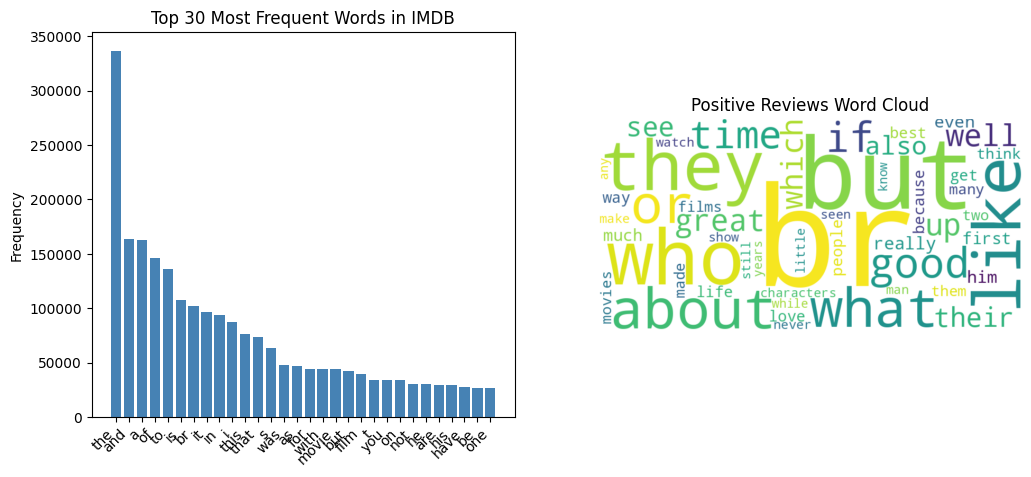
    # --- 可视化 1: 词汇表词频分布 (长尾效应) ---
    top_30_words = total_counter.most_common(30)
    words, counts = zip(*top_30_words)

    plt.figure(figsize=(12, 5))
    plt.subplot(1, 2, 1)
    plt.bar(words, counts, color='steelblue')
    plt.xticks(rotation=45, ha='right')
    plt.title("Top 30 Most Frequent Words in IMDB")
    plt.ylabel("Frequency")

    # --- 可视化 2: 情感词云图对比 ---
    # 生成正面评论词云
    wc_pos = WordCloud(width=800, height=400, background_color='white', max_words=50).generate_from_frequencies(pos_counts)
    # 生成负面评论词云
    wc_neg = WordCloud(width=800, height=400, background_color='black', max_words=50, colormap='Reds').generate_from_frequencies(neg_counts)

    plt.subplot(1, 2, 2)
    plt.imshow(wc_pos, interpolation='bilinear')
    plt.axis("off")
    plt.title("Positive Reviews Word Cloud")

    plt.figure(figsize=(6, 4))
    plt.imshow(wc_neg, interpolation='bilinear')
    plt.axis("off")
    plt.title("Negative Reviews Word Cloud")

    plt.show()
else:
    print(f"❌ 找不到数据集路径: {dataset_path}")
    print("请确保已将 IMDB 数据集解压到 ./data/aclImdb/ 目录下。")
def text_to_sequence(text, vocab):
    return [vocab.get(token, 0) for token in tokenize(text)]  # 0 for unknown words

def pad_sequences(sequences, maxlen):
    return [seq + [0] * (maxlen - len(seq)) if len(seq) < maxlen else seq[:maxlen] for seq in sequences]

# Example use
text = "This is an example."
seq = text_to_sequence(text, vocab)
padded_seq = pad_sequences([seq], maxlen=256)  # Example maxlen
print(seq)
[316, 3, 108, 34089]
这段代码是自然语言处理(NLP)任务中非常经典的数据预处理流程,主要用于将原始文本转换为深度学习模型可以接受的数字矩阵。
下面我将从**代码含义**、**实现原理**、**用途**和**注意事项**四个方面为你详细解释。
### 一、 代码含义逐行解析
1. *text_to_sequence(text, vocab) 函数**
- **功能**:将一段文本转换为一个整数索引序列。
- tokenize(text):将文本切分成词或子词的列表(注:此函数在代码中未定义,通常由第三方库如 nltk, spaCy 或自定义函数实现)。
- vocab.get(token, 0):查找当前词在词表 vocab 中的索引。如果词不在词表中(即未知词/Out-of-Vocabulary, OOV),则默认返回 0。
- 整体使用列表推导式,返回一个由整数组成的列表。
2. *pad_sequences(sequences, maxlen) 函数**
- **功能**:将多个长度不一的序列统一填充或截断到固定长度 maxlen。
- seq + [0] * (maxlen - len(seq)):如果序列长度小于 maxlen,则在序列末尾补 0。
- seq[:maxlen]:如果序列长度大于 maxlen,则截断保留前 maxlen 个元素。
- 同样使用列表推导式,返回一个形状统一的二维列表。
3. **示例部分**
- 对文本 "This is an example." 进行转换和填充(假设 vocab 已在外部定义)。
- padded_seq 的长度将被固定为 256。
---
### 二、 实现原理
这段代码的核心原理是**文本的数值化与张量化**,这是让计算机“看懂”文本的必经之路:
1. **离散映射(符号化 -> 数值化)**:计算机无法直接处理字符串,必须建立符号到整数的映射表(即 vocab 字典)。通过查表操作,将文本转化为离散的整数序列。
2. **规整化(变长 -> 定长)**:深度学习模型(如 RNN, CNN, Transformer)通常要求输入是按批次传递的张量,这就要求同一个 Batch 内的序列长度必须一致pad_sequences 通过**填充**和**截断**操作,将变长序列对齐到同一维度,从而能够堆叠成规整的矩阵。
---
### 三、 用途
这段代码广泛应用于各类 NLP 任务的数据预处理阶段,包括但不限于:
- **文本分类**:如情感分析、垃圾邮件检测(输入为定长索引序列,输出为类别)。
- **序列到序列任务**:如机器翻译、文本摘要(编码器和解码器的输入都需要经过此类处理)。
- **语言模型**:如 GPT、BERT 等大模型的微调与推理的底层数据准备。
---
### 四、 注意事项与改进建议
1. **缺失的 tokenize 函数**:
代码中调用了 tokenize(text),但未定义。实际使用时需要引入分词器,例如:
```python
def tokenize(text):
return text.lower().replace('.', ' .').split() # 简单的按空格和标点切分
```
2. **缺失的 vocab 字典**:
运行示例代码前,必须定义词表,例如vocab = {"this": 1, "is": 2, "an": 3, "example": 4, ".": 5}。
3. **填充位置(Pre-padding vs Post-padding)**:
当前代码使用的是**后填充**,即在序列末尾补0。但在某些模型(特别是 RNN/LSTM)中,**前填充**(在序列开头补0)效果更好,因为模型最后读取的往往是有效的语义信息,而不是无意义的0。如果需要前填充,可修改为[0] * (maxlen - len(seq)) + seq。
4. **截断位置**:
当前代码使用的是**截断前部**seq[:maxlen])。如果关键信息集中在文本末尾,这种截断会丢失重要特征。可以改为保留末尾信息seq[-maxlen:]。
5. **填充值的掩码**:
补充的 0 没有实际语义,在输入到模型(如 Transformer)时,必须配合 **Attention Mask** 使用,告知模型忽略这些填充位置,否则会影响计算结果。
6. **工业级替代方案**:
在实际工程中,建议直接使用成熟的库(如 HuggingFace transformers 的 tokenizer 或 Keras 的 keras.preprocessing.sequence.pad_sequences),它们不仅封装了这些基础操作,还支持更高级的功能(如动态填充、Attention Mask 自动生成等),效率和安全性更高。
---
### 五、 完整可执行代码示例
为了让你能直接运行并理解,我补充了缺失的部分:
```python
def tokenize(text):
# 简单的转小写、分离标点并按空格切分
return text.lower().replace('.', ' .').split()
def text_to_sequence(text, vocab):
return [vocab.get(token, 0) for token in tokenize(text)] # 0 for unknown words
def pad_sequences(sequences, maxlen):
return [seq + [0] * (maxlen - len(seq)) if len(seq) < maxlen else seq[:maxlen] for seq in sequences]
# 模拟词表
vocab = {"this": 1, "is": 2, "an": 3, "example": 4, ".": 5}
# Example use
text = "This is an example."
seq = text_to_sequence(text, vocab)
print("原始索引序列:", seq) # 输出: [1, 2, 3, 4, 5]
padded_seq = pad_sequences([seq], maxlen=10) # 缩小maxlen以便观察
print("填充后序列:", padded_seq) # 输出: [[1, 2, 3, 4, 5, 0, 0, 0, 0, 0]]
padded_seq_short = pad_sequences([seq], maxlen=3) # 测试截断
print("截断后序列:", padded_seq_short) # 输出: [[1, 2, 3]]
# Less naive tokenization with words in frequency order
from collections import Counter
import os

# Simple tokenizer
def tokenize(text):
    return text.lower().split()

# Build vocabulary
def build_vocab(path):
    counter = Counter()
    for folder in ["pos", "neg"]:
        folder_path = os.path.join(path, folder)
        for filename in os.listdir(folder_path):
            with open(os.path.join(folder_path, filename), 'r', encoding='utf-8') as file:
                counter.update(tokenize(file.read()))

    # Sort words by frequency in descending order
    sorted_words = sorted(counter.items(), key=lambda x: x[1], reverse=True)

    # Create vocabulary with indices starting from 1
    vocab = {word: idx + 1 for idx, (word, _) in enumerate(sorted_words)}
    vocab['<pad>'] = 0  # Add padding token with index 0
    return vocab

vocab = build_vocab("./data/aclImdb/train/")
这段代码实现了一个基于词频的自然语言处理(NLP)基础任务:**构建词汇表**。它读取文本数据,统计词频,并按照词频从高到低的顺序为每个词分配一个唯一的整数索引。
以下是详细的解释:
### 1. 实现原理
代码的执行流程可以分为以下几个步骤:
1. 分词tokenize 函数将输入的文本字符串转换为小写,并按空格切分成单词列表。
2. 词频统计build_vocab 函数遍历指定路径下的 pos(正面)和 neg(负面)文件夹中的所有文件,读取文本并使用 collections.Counter 统计所有单词在整个语料库中出现的总次数。
3. 排序:将统计好的词频字典转换为元组列表,并按词频(元组的第二个元素)降序排列。
4. 构建索引字典:遍历排序后的列表,从索引 1 开始依次为每个单词分配整数 ID。词频越高的词,索引越小。最后,手动将特殊标记 <pad> 的索引设为 0。
### 2. 用途
这段代码通常用于深度学习/NLP模型的**数据预处理阶段**(特别是情感分析任务,从路径 aclImdb 可以看出这是在处理经典的IMDB电影评论数据集)。
- 文本向量化:深度学习模型无法直接处理字符串,必须将文本转换为整数索引。这个 vocab 字典就是映射的桥梁(如 vocab['movie'] = 15)。
- 按频次排序的意义:在后续模型训练时,如果需要截断过长的句子,或者只保留最常见的 Top-K 个词,按频次排序可以确保高频且通常更重要的词被保留,而低频词(或罕见词)被过滤掉(通常映射为 <unk>)。
- Padding机制:在将变长句子组合成一个 Batch 输入给神经网络时,通常需要将它们补齐到相同长度。索引为 0 的 <pad> 标记就是用来做填充的,后续在计算损失函数时,可以通过 ignore_index=0 来忽略填充部分的损失。
### 3. 注意事项与局限性
虽然这段代码被称为 "Less naive"(不那么朴素)的切词方法,但在实际工业级应用中,仍存在以下需要注意的问题:
1. 分词过于简单:
- text.lower().split() 仅按空格切分,它无法处理标点符号(如 "hello!" 和 "hello" 会被视为不同的词),也无法处理缩写(如 "don't" 不会被正确拆分)。
- 改进建议:使用更成熟的分词工具,如 NLTK、spaCy,或者基于子词的分词器(如 HuggingFace 的 BERT Tokenizer,BPE,WordPiece 等)。
2. 缺乏对未知词的处理:
- 当前的词汇表包含了训练集中的所有单词。但在测试集或实际应用中,一定会遇到词汇表中没有的词,这会导致代码报错或无法正确映射。
- 改进建议:在构建词汇表时,应加入 <unk>(未知词)标记,并在映射时设定默认返回 <unk> 的索引。
3. 内存与性能问题:
- Counter.update() 在处理海量文本时可能会消耗大量内存。
- 代码一次性读取整个文件 file.read(),如果存在超大文件可能会导致内存溢出(OOM)。虽然对于IMDB这种小数据集没问题,但扩展性较差。
4. 大小写敏感度:
- 代码使用了 lower() 统一转为小写,这有助于减少词汇量(让 Apple 和 apple 合并在小数据集上是好习惯)。但在某些需要区分专有名词的场景中,这会丢失信息。
### 总结
这段代码提供了一个清晰、易懂的基线词汇表构建方法,适合用于学习和小型NLP项目(如IMDB情感分类)。但如果要应用于生产环境,建议使用更高级的分词算法并补充 <unk> 等必要的特殊标记。
# Less naive tokenization with words in frequency order
from collections import Counter
import os

# Simple tokenizer
def tokenize(text):
    return text.lower().split()

# Build vocabulary
def build_vocab(path):
    counter = Counter()
    for folder in ["pos", "neg"]:
        folder_path = os.path.join(path, folder)
        if not os.path.exists(folder_path): # 防止路径不存在报错
            continue
        for filename in os.listdir(folder_path):
            with open(os.path.join(folder_path, filename), 'r', encoding='utf-8', errors='ignore') as file:
                counter.update(tokenize(file.read()))

    # Sort words by frequency in descending order
    sorted_words = sorted(counter.items(), key=lambda x: x[1], reverse=True)

    # Create vocabulary with indices starting from 1
    vocab = {word: idx + 1 for idx, (word, _) in enumerate(sorted_words)}
    vocab['<pad>'] = 0  # Add padding token with index 0
    return vocab, sorted_words # 🔥 修改:同时返回排序好的词频列表,方便后续打印

# 🔥 修改:接收返回的排序列表
vocab, sorted_words = build_vocab("./data/aclImdb/train/")

# ==========================================
# 美观打印区域
# ==========================================

print(f"📊 词汇表总大小: {len(vocab)} 个词\n")

# -----------
# 方式一:查看高频词和低频词(最推荐,快速了解数据分布)
# -----------
print("🏆 【Top 20 高频词】(索引越小,频次越高):")
print("-" * 30)
for word, freq in sorted_words[:20]:
    idx = vocab[word]
    # 使用 f-string 格式化对齐:{idx:<5} 表示左对齐占5个字符宽度
    print(f"  索引: {idx:<5} 词频: {freq:<6} 词: '{word}'")

print("\n...\n")

print("📉 【Top 20 低频词】(出现次数最少的词):")
print("-" * 30)
for word, freq in sorted_words[-20:]:
    idx = vocab[word]
    print(f"  索引: {idx:<5} 词频: {freq:<6} 词: '{word}'")


# -----------
# 方式二:分段打印(适合查看特定范围的索引映射)
# -----------
print("\n📖 【索引 1~30 映射详情】(每行3个):")
print("-" * 50)
items_to_show = list(vocab.items())[1:31] # 跳过0的<pad>,看1-30
for i in range(0, len(items_to_show), 3):
    # 每次取出3个元素打印在一行
    chunk = items_to_show[i:i+3]
    # 生成类似 " 'the': 1  |  'and': 2  |  'a': 3 " 的格式
    line = "  |  ".join([f"'{word}': {idx}" for word, idx in chunk])
    print(f"  {line}")


# -----------
# 方式三:查找特定词汇的索引(最实用的调试方法)
# -----------
test_words = ['movie', 'film', 'bad', 'good', 'awesome', 'terrible', 'unknownword']
print("\n🔍 【特定词汇查询】:")
print("-" * 30)
for word in test_words:
    # 使用 get 方法,如果找不到返回 '<UNK>' 标识
    idx = vocab.get(word, "未收录(UNK)")
    print(f"  '{word}' -> 索引: {idx}")
📊 词汇表总大小: 251638 个词
🏆 【Top 20 高频词】(索引越小,频次越高):
------------------------------
索引: 1 词频: 322198 词: 'the'
索引: 2 词频: 159953 词: 'a'
索引: 3 词频: 158572 词: 'and'
索引: 4 词频: 144462 词: 'of'
索引: 5 词频: 133967 词: 'to'
索引: 6 词频: 104171 词: 'is'
索引: 7 词频: 90527 词: 'in'
索引: 8 词频: 70480 词: 'i'
索引: 9 词频: 69714 词: 'this'
索引: 10 词频: 66292 词: 'that'
索引: 11 词频: 65505 词: 'it'
索引: 12 词频: 50935 词: '/><br'
索引: 13 词频: 47024 词: 'was'
索引: 14 词频: 45102 词: 'as'
索引: 15 词频: 42843 词: 'for'
索引: 16 词频: 42729 词: 'with'
索引: 17 词频: 39764 词: 'but'
索引: 18 词频: 31619 词: 'on'
索引: 19 词频: 30887 词: 'movie'
索引: 20 词频: 29059 词: 'his'
...
'good' -> 索引: 55
'awesome' -> 索引: 1634
'terrible' -> 索引: 494
'unknownword' -> 索引: 未收录(UNK)
Output is truncated. View as a scrollable element or open in a text editor. Adjust cell output settings...A dramatic, cinematic visual metaphor for data acquisition. The scene is set in a futuristic, semi-dark data vault. From the unseen digital space (representing the internet/URL), a giant, shimmering compressed data cube (labeled 'IMDb Reviews') slowly descends. This cube is visibly cracked open or dissolving, spilling out a massive, luminous torrent of raw text streams and data packets. The spilled data streams flow onto a glowing analysis platform, symbolizing the beginning of the NLP journey. Integrate subtle elements of starlight and deep learning neural networks to emphasize the immense potential contained within the raw data. Use a palette of deep velvet blacks, neon blue, and brilliant gold. Cinematic, volumetric lighting, masterpiece quality, 8K.